Subcontractor change orders are how field extras turn into money, and the ones that don’t get paid usually come up short on paper, not on the work. I know because I read them. I worked the tinner trade for about four years. I’ve been in construction more than twenty years, and now I manage projects for a general contractor in Salt Lake. Sub change orders and pay apps cross my desk every week.
I wrote eight posts on getting paid for field extras. This page puts them in the order the work happens. Before the work, pricing it, the paperwork, and billing it. Read the short version here, then click into the one you need.
Why subcontractor change orders get stuck on my desk
Every change that lands on my desk gets checked. I look at the total, the hours, the backup and the rates. Then my project engineer, the super, the architect, the owner’s rep and accounting all touch it before anybody cuts a check.
A change that stands on its own moves. One that doesn’t gets a phone call or gets kicked back, and every trip around that loop costs both sides again. The subs whose subcontractor change orders go through clean have all the right documentation. They know that if it’s tracked, they can argue it.
Before the work starts
A lot of field extras start with somebody saying “just do it.” Good subcontractor change orders start before the work does. These two posts cover that part.
Extra work before the change order is approved
Extra work often starts before the change order is signed, because somebody is comfortable the owner will pay. If the owner is paying, the direction should come from the owner, through an RFI response, an owner change directive, an ASI, an owner proposal request or a bulletin. In the field, email is best, a screenshot of a text is enough, and you get a rough order of magnitude (ROM) in writing before you start. The full post is extra work in construction before the change order is approved.
Time and material tickets a GC can sign
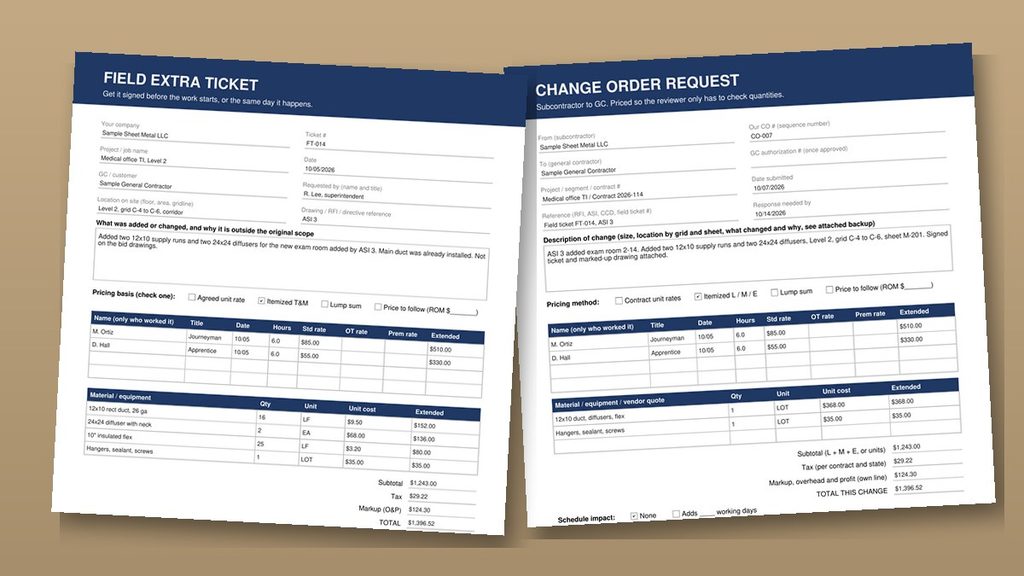
A T&M ticket is the daily record of the people, hours, material and equipment on work that isn’t in your contract. Get the super to sign it the day of the work, because a late ticket is a harder ticket to approve. On my jobs, the super’s signature means he saw the paper, not that we agreed to pay. Here’s what gets tickets rejected, and how premium time works, in time and material tickets a GC can check and sign.
Pricing subcontractor change orders
Once you know it’s extra, it needs a number. These three posts cover the price of the work, the cost of the paperwork, and how agreed rates make a change faster to approve.
How to price the extra
For a small add to work you already priced, charge your unit rate, in writing, before you start. Once the job has cleared its floor, that add only carries its own material and labor, so it’s where your margin lives. If the add needs a new trip, a supply house run or a design answer, it’s a new price, not an add. The breakdown is in how to price an HVAC change order.
What a change order costs to produce
No change order is free. In my example, it costs a sub about $400 just to produce one, and my rough estimate for the review on the GC, owner and architect side is $2,500 or more. Bundle small items if you want, but don’t hold them past the deadline in your contract. The math is in how much does a change order cost.
Unit price change orders
When a change is priced with rates already written into the contract, I only check the quantities, and it moves. Keep overhead and profit on its own line, and keep your rates consistent from one change to the next. Back up every piece of your burden rate, because an agreed rate can still get audited. See unit price change orders a GC can check and approve.
The paperwork behind subcontractor change orders
A fair price still has to get through review. When I review subcontractor change orders, I’m reading your form and your log. These two posts cover both.
A change order template a GC can approve
I look at the total first, then the itemized hours, the backup, the scope and whether your rates match the contract. I don’t accept lump sums on changes. Write a description that says where, what and why with the sheet and grid, give schedule impact its own line, and put your number next to the GC’s number. The full layout is in HVAC change order template a GC can approve fast.
A change order log the GC can use
I don’t keep a change log for my subs. I use theirs. Number every change, sort by item number, track it as open, submitted or closed, and send the log with every pay app. The columns are in subcontractor change order log a GC can track.
Billing it on your pay app
An approved change still has to get billed. That happens on your schedule of values.
The schedule of values
Each approved change goes on its own line at the bottom of your schedule of values and rolls into the new contract total. Bill it only after you have the written authorization, whatever your GC’s software calls it, and make sure the total ties out. Stored material billed in the wrong column is the number one reason I kick back a pay app. Set it up right with how to build an HVAC schedule of values a GC can approve fast.
The rules under all of it
My rules don’t change from post to post. Nothing gets agreed out loud. Don’t start until the price and the time are in writing. When somebody wants a number on the spot, give one or say you need to check. Don’t guess.
Every one of the eight posts comes back to that. Written direction, a fair number, clean backup and a straight bill are what get subcontractor change orders paid.
Where to start
Start with the problem in front of you.
- The super just said “just do it.” Read the extra work post, then the T&M ticket post.
- Somebody wants a price on an add. Read how to price an HVAC change order.
- Your changes keep coming back. Read the change order template post and the cost post.
- You lose track of what’s open. Read the change order log post.
- Your pay app got kicked back. Read the schedule of values post.
If you’re new to all of it, read them top to bottom. That’s the order the work happens. And read the change and notice clause in your contract so you know how long you have. I’m not a lawyer, and this isn’t legal advice.
Keep them in the field for quick use
The Change Log Template will help you keep track of what is extra. The Field Extras Starter Sheet is one page. It has the checklist I’d run before saying yes to any extra, how to figure your floor price in three lines, and what to say when somebody wants a number on the spot. It’s free.